Hello there!
First, yes, I'm alive... You just need to know where to look for (Hint: Flickr or dA).
Second, no, this won't be a long post.
Third, new project!
https://github.com/zebarnabe/music-keyboard-vhdl/
Regarding this last point, I'm building an audio synthesizer from my dead Casio SA-10 (non-destructive modifications, might be able to repair it in the future) and my old Digilent Nexys 2 FPGA board...
So far, so good... It works as a proof of concept, though I need to make it properly since to ensure polyphony I instantiated 32 basic synthesizers instead of properly serialize the processes ... processing everything at the same time is always fun in a FPGA.
Currently taken logic is at 10%, I guess I can make it a lot better by serializing the output mixer alone... or lower the precision... 144kHz sampling with 16bits and 32 channels is a bit overkill, specially when the PWM controller only does 8 bits.
Tuesday, October 27, 2015

Saturday, November 24, 2012
Playing with Blender Cycles render engine
So, I've played with Blender in the past, but having installed Ubuntu 12.10 and with Blender Cycles render around, I solved to give it a try again and see what could be done.
First the 12.10 repository doesn't have a Blender version with Cycles render, so you will have to manually install it from Blender website, fairly easy if you as me.
Installing CUDA to have GPU acceleration is quite a different matter, I leave that for other time, as Nvidia only supports/provides a version for 11.x Ubuntu...
After installing CUDA I found out that I wasn't entitled to GPU acceleration, my card is too old for that, following this thread you might get the idea:
http://blenderartists.org/forum/showthread.php?238557-Blender-Cycles-GPU-Rendering-Shader-Model-gt-1-3-Required
But that doesn't prevent me from using Cycles, it is just a pain to render, but, the normal Blender Render engine is quite the same.
I started with a simple scene and quickly went to nodes to see what could be done...

... Looks nice doesn't it?
Aside from modeling some stuff, I tried more render features, textures and more stuff with nodes in a simple scene, It all went well till I added some extra stuff to the scene ... and then:

Those white dithering specks are due to the emission planes that are lighting the scene.... I have no idea how to prevent them, removing caustics had no effect :/
Maybe all that white in the background has something to do with it... but the artifact is there when it shouldn't, I noticed that the more sample rays I add the more likely it is to happen in the given scene (though they start to fill up as circles/blobs).
I could set more sample rays to reduce the dithering effect, but with 20 mins of rendering time that would be quite a longer wait.
Well, not that bad, but quite annoying... quite a pleasant surprise that I still knew my way around Blender.
I leave with a model of an Yordle (from League of Legends lore), no textures I'm afraid, I didn't have the time for that:

It is rigged with a simple skeleton, enough to make small animations :]
Friday, September 28, 2012
Laptop issues
So, even though my blog readers are close to none, I'm wondering if someone has an idea why my laptop (a rebadged MSI GX620) is having thermal issues:
Fan is working well
Heatsink is unclogged
Thermal plates/pipes are in place and driving the heat to the heat-sink
CPU is idling
GPU is idling
Currently I've underclocked the entire system to the maximum possible, CPU is running as a at 800Mhz (from 2.4GHz), GPU is running at 125Mhz/200Mhz/312Mhz (for Core, Memory and Shader clocks and from 500Mhz/800Mhz/1250Mhz)
Hardrive has power saving policies applied
Temperature is currently 43ºC for CPU, 41ºC for Hardrive and 54ºC for GPU...
GPU heat pipe passes through the CPU heat plate, then the 2 heat-pipes go into the heat-sink.
In the past I would have an hard time to make it go past 30ºC (basically it would require me to push everything to the max in a hot day of summer) and the top I've reached before was around 40ºC (with the heat-sink clogged and pushing it a bit) ... Recently it started doing this, where the temperature never goes under 40ºC and it reaches 70ºC if I set it to normal clock speeds (and just idle).
The heatsink is really hot and the fan is working properly, the air flow seems right as well, so I'm puzzled why it is doing this as it all seems to work as it should but it not near of what it was in the past, it is running way too hot to be safe, if I push it, graphics card will probably reach the shutdown temperature (105ºC) before CPU reaching the thermal shutdown, I really don't want to try it...
I've tried to use a cooling station base, it has no effect whatsoever, ironically having it on the bed seems to be as effective as having it on the cooling station...
Oh well... soon I'll have no need for a laptop, so it really doesn't matter, though it is puzzling why this is happening...
EDIT:
To further test my system I ran stress tests on my system, it is holding under 75ºC for CPU and 85ºC for GPU, my guess is that the thermal grease as lost some of its conductivity, if I overclock my GPU to (700Mhz/800Mhz/1600Mhz - crazy improvement, but very stable) it never goes past 85ºC under heavy load.
I'm not that worried as it seems the cooling system is still working fine, just the efficiency got reduced with the age. I won't need a new laptop, nor I'll be selling this one.
PS:
If you're looking for a new laptop the old Asus N53 with a quad core i7 CPU, full HD matte (high brightness, contrast and color reproduction) and another remarkable points is being sold for 700€ (but it is very hard to find on stores), above that, with a faster CPU/RAM/GPU configuration, the latest model, the Asus N56VM is available for 800~850€ (a bit more if you want retro-illuminated keyboard, bluetooth, hybrid hardrive or some extra RAM), add a bit more (+50~100€) and N56VZ has some extra GPU power on it.
Fan is working well
Heatsink is unclogged
Thermal plates/pipes are in place and driving the heat to the heat-sink
CPU is idling
GPU is idling
Currently I've underclocked the entire system to the maximum possible, CPU is running as a at 800Mhz (from 2.4GHz), GPU is running at 125Mhz/200Mhz/312Mhz (for Core, Memory and Shader clocks and from 500Mhz/800Mhz/1250Mhz)
Hardrive has power saving policies applied
Temperature is currently 43ºC for CPU, 41ºC for Hardrive and 54ºC for GPU...
GPU heat pipe passes through the CPU heat plate, then the 2 heat-pipes go into the heat-sink.
In the past I would have an hard time to make it go past 30ºC (basically it would require me to push everything to the max in a hot day of summer) and the top I've reached before was around 40ºC (with the heat-sink clogged and pushing it a bit) ... Recently it started doing this, where the temperature never goes under 40ºC and it reaches 70ºC if I set it to normal clock speeds (and just idle).
The heatsink is really hot and the fan is working properly, the air flow seems right as well, so I'm puzzled why it is doing this as it all seems to work as it should but it not near of what it was in the past, it is running way too hot to be safe, if I push it, graphics card will probably reach the shutdown temperature (105ºC) before CPU reaching the thermal shutdown, I really don't want to try it...
I've tried to use a cooling station base, it has no effect whatsoever, ironically having it on the bed seems to be as effective as having it on the cooling station...
Oh well... soon I'll have no need for a laptop, so it really doesn't matter, though it is puzzling why this is happening...
EDIT:
To further test my system I ran stress tests on my system, it is holding under 75ºC for CPU and 85ºC for GPU, my guess is that the thermal grease as lost some of its conductivity, if I overclock my GPU to (700Mhz/800Mhz/1600Mhz - crazy improvement, but very stable) it never goes past 85ºC under heavy load.
I'm not that worried as it seems the cooling system is still working fine, just the efficiency got reduced with the age. I won't need a new laptop, nor I'll be selling this one.
PS:
If you're looking for a new laptop the old Asus N53 with a quad core i7 CPU, full HD matte (high brightness, contrast and color reproduction) and another remarkable points is being sold for 700€ (but it is very hard to find on stores), above that, with a faster CPU/RAM/GPU configuration, the latest model, the Asus N56VM is available for 800~850€ (a bit more if you want retro-illuminated keyboard, bluetooth, hybrid hardrive or some extra RAM), add a bit more (+50~100€) and N56VZ has some extra GPU power on it.
Monday, August 13, 2012
FZ200 - The F2.8 bridge camera
Just a quick note, Panasonic Lumix FZ200 is an impressive camera on paper. I wonder how well it will fare in practice.
The f/2.8 lens allow the use of a huge aperture at the end of the telephoto, this is great to blur the background/foreground and to avoid the use of high ISO, thus increasing the delivered quality in the photos.
Usually Lumix cameras are quick in operation, but their sensors could fare somewhat better. FZ150 did an excellent job for what it was.
So, with all this in mind I searched for some samples online, and found a few, sadly most are low resolution or/and pre-production samples, thus making it hard to assert a conclusion over this unique camera.
The best samples I found were in http://www.quesabesde.com/noticias/panasonic-fz200-analisis-fotos-muestras-video,1_8941
They are the best samples simply because they are RAW files, they don't display the performance over the entire ISO range nor zoom range, but they already gave me an idea of what the camera is capable.
The good thing on the camera (aside from the f/2.8 available through the entire zoom range) is that lens sharpness seems to be very good in center, with some variations in the edges and corners. At its worse the sharpness in the corners is tolerable and quite acceptable for such specs. Same thing goes for chromatic aberrations, even though they are a bit on the high side in some situations.
The bad thing is.... Noise and dynamic range, not that much of a surprise, but at ISO 100 it is just plain bad to have that much noise. Dynamic range is bad, but tolerable, shooting in high dynamic range setups would result in blown skies far too easily though.
You can see the converted RAW files here: https://picasaweb.google.com/113342388960491676361/FZ200RAWSamples?authuser=0&feat=directlink
So ... what that leaves me with? A camera that is not that good, but packing some very nice specs. In the end is not the camera that will mark the difference, even though the f/2.8 lens are unique to it. Price will be scary at the release, but will get down to tolerable values in 3~6 months after the release.
Given the compact design of such lens, one can hope that a f/2.8 12x can be made with roughly the same size, while sporting a bigger and better sensor on the back.
And as an end note, LX7 samples that I found were quite impressive (specially when compared with the FZ200 ones)
Oh well, micro four thirds still has a huge distance over the compact realm ... specially with the new G5 and E-M5 cameras... as for me, the old GH1 will fit the bill till it is rotten.
The f/2.8 lens allow the use of a huge aperture at the end of the telephoto, this is great to blur the background/foreground and to avoid the use of high ISO, thus increasing the delivered quality in the photos.
Usually Lumix cameras are quick in operation, but their sensors could fare somewhat better. FZ150 did an excellent job for what it was.
So, with all this in mind I searched for some samples online, and found a few, sadly most are low resolution or/and pre-production samples, thus making it hard to assert a conclusion over this unique camera.
The best samples I found were in http://www.quesabesde.com/noticias/panasonic-fz200-analisis-fotos-muestras-video,1_8941
They are the best samples simply because they are RAW files, they don't display the performance over the entire ISO range nor zoom range, but they already gave me an idea of what the camera is capable.
The good thing on the camera (aside from the f/2.8 available through the entire zoom range) is that lens sharpness seems to be very good in center, with some variations in the edges and corners. At its worse the sharpness in the corners is tolerable and quite acceptable for such specs. Same thing goes for chromatic aberrations, even though they are a bit on the high side in some situations.
The bad thing is.... Noise and dynamic range, not that much of a surprise, but at ISO 100 it is just plain bad to have that much noise. Dynamic range is bad, but tolerable, shooting in high dynamic range setups would result in blown skies far too easily though.
You can see the converted RAW files here: https://picasaweb.google.com/113342388960491676361/FZ200RAWSamples?authuser=0&feat=directlink
So ... what that leaves me with? A camera that is not that good, but packing some very nice specs. In the end is not the camera that will mark the difference, even though the f/2.8 lens are unique to it. Price will be scary at the release, but will get down to tolerable values in 3~6 months after the release.
Given the compact design of such lens, one can hope that a f/2.8 12x can be made with roughly the same size, while sporting a bigger and better sensor on the back.
And as an end note, LX7 samples that I found were quite impressive (specially when compared with the FZ200 ones)
Oh well, micro four thirds still has a huge distance over the compact realm ... specially with the new G5 and E-M5 cameras... as for me, the old GH1 will fit the bill till it is rotten.
Thursday, June 21, 2012
Chrome Extensions: v2
So .... Google Chrome Extensions will soon require version 2 of manifest files and respective implementation.
I have my fairly complex Chrome Extension that makes use of several experimental/brand new HTML 5 technologies/tools: Drag&Drop, File API, Indexed DB, Canvas, etc...
Usually I keep an eye on the upcoming updates by having Chromium channel installed together with the stable Chrome release. I have this because certain implementations (ex: File API) are based on a draft spec, thus having the time to fix anything that might be modified before hit the stable release.
The last Chromium update caught me by surprise, I was expecting something to be broken as usual, I was not expecting that the manifest and some required implementations would be changed...
 I find this gif to accurately express my face when I start reading the change log. I understand why they changed most of the stuff the way they did, but it has that feelling of "You must be joking" when I look at it...
Luckily for me, most of the stuff I did is compatible with the update, requiring just some touches in manifest file to make it work, though, those popup and options pages will suffer quite a few changes that make me shiver at the though of what I have to change and what else can get broken by it...
Even if I have no readers on my blog, if you made a Google Chrome Extension (or use one that might not have the best update support), take note:
http://code.google.com/chrome/extensions/manifestVersion.html
Look closely at that schedule support...
Good luck and happy coding :]
I have my fairly complex Chrome Extension that makes use of several experimental/brand new HTML 5 technologies/tools: Drag&Drop, File API, Indexed DB, Canvas, etc...
Usually I keep an eye on the upcoming updates by having Chromium channel installed together with the stable Chrome release. I have this because certain implementations (ex: File API) are based on a draft spec, thus having the time to fix anything that might be modified before hit the stable release.
The last Chromium update caught me by surprise, I was expecting something to be broken as usual, I was not expecting that the manifest and some required implementations would be changed...
Luckily for me, most of the stuff I did is compatible with the update, requiring just some touches in manifest file to make it work, though, those popup and options pages will suffer quite a few changes that make me shiver at the though of what I have to change and what else can get broken by it...
Even if I have no readers on my blog, if you made a Google Chrome Extension (or use one that might not have the best update support), take note:
http://code.google.com/chrome/extensions/manifestVersion.html
Look closely at that schedule support...
Good luck and happy coding :]
Friday, April 20, 2012
HTML5 stuff
I've been playing with HTML5 APIs for quite some time (not exactly playing, but the blog is neglected as usual). In my Javascript code junkyard folder on the 0nyx server you can play with it and check the source if needed: http://www.zebarnabe.0nyx.com/JS/dragdropfile/file.html
Take in mind that Drag and Drop API is divided into 2 different APIs ... the 'old' one and the 'new' one, my sample tries to support both to a certain extent... oh ... and you can drag and drop files ... the content of them is shown in base64 data url.... quite useful to convert icons and small images to base64, not that good to check that 64MB video file you have there...
Have fun and hope it is useful
Take in mind that Drag and Drop API is divided into 2 different APIs ... the 'old' one and the 'new' one, my sample tries to support both to a certain extent... oh ... and you can drag and drop files ... the content of them is shown in base64 data url.... quite useful to convert icons and small images to base64, not that good to check that 64MB video file you have there...
Have fun and hope it is useful
Monday, September 26, 2011
How to pick a camera (or try to)
Many people ask me stuff about gadgets, cameras nowadays are seen as gadgets given their presence in mobile phones and integration with printers and other strange stuff, however the purpose of them has not changed even if it's either a digital or analog medium: To record an image.
So, I receive lots of requests asking me if camera X is better than camera Y, if feature A does any good or if price is good for camera Z.
To pick a camera, you have to define answers for these questions:
And talking about compromises, please note that there is no perfect camera for everything, so don't expect perfection.
To understand the third question I'll expose you to where image quality can be evaluated:
I solved to divide this guide in camera purpose, and will try to give some suggestions for several price tags.
When I mention "Search for a camera" I meant check for reviews websites with real use samples.
First, read a guide about photography in general, something that explains how a photo is recorded, what aperture, focal length, shutter speed and ISO are.
If you are lazy and don't want to do that I'll make a very resumed explanation here:
Record mementos - for small prints, social networks and email share - the lowest budget possible:
If you want a camera to snap some special moments to remember later and share online, a mobile phone camera might suffice, by that I mean that any camera would do, however, if the quality of the photo matters (because you may print or edit the photos taken) something a bit better than a lousy mobile phone camera is probably required.
There are lots of cheap cameras that already offer more than enough quality, I suggest that you seek one that behaves well in low light as most of the time you don't want to/can't use a flash and the light indoors means that your ISO will have to be at a higher value than the ideal. If you know that you will use the flash, check how well the flash illuminates a given scene.
Search for a camera with an acceptable quality at ISO 800 and you should be okay, but bare in mind that when light is non-existent (night shot) you will need to use either flash or a tripod, usually you would only use a flash in this kind of camera. You won't be needing lots of zoom or other gimmicks, but video is always a good thing to have.
For this kind of use, Canon A800 or Canon A1200 are good cameras for their price, with them you can even print fairly large (A4) and get a nice quality, obviously in low light they will start getting a hit, you can check similar cameras as well and use these as a comparison term. Search for cameras with wide angle lens... this is hard to define but 24mm equivalent is a very good wide angle in a compact - this makes group shots easier to take.
Compact and versatile - take it every where, record everything:
If you think in using the camera to explore photography in general, but you are thinking in spare some change on your wallet it may be a bit tricky to select a camera, you will probably want some zoom capability (10x is pretty nice) on some wide angle lens (at least 28mm in film equivalent terms) with good manual modes (check for P,A,S and M modes on the mode dial) and low light capabilities (Check samples online from ISO 400 to ISO 1600). This is very tricky to find at a low price, be prepared to make some compromise.
Often you have lots of features you may or may not want, be aware of that (will you really use slow motion video features? or GPS?).
If you want it to record video as well, you'll be happy to know that most of he modern cameras allow you to record in HD, however not all are worthy of being selected for just that. Some cameras have really bad video quality, so check samples online. Avoid interpolated video recording and while it is up to personal preference, prefer cameras with 24/25 fps video recording instead of 50/60 fps, this will give a better feel to the video, however higher frame rates allow you to do slow motions at ease.
I'll leave some camera suggestions as terms of comparison, Canon SX220 HS (or SX230 HS - it has GPS as an extra, might not worth the extra price though) and Sony HX9V. For something cheaper you have Olympus SZ-10, for something with even more zoom you can either look at the bridge segment or the peculiar Olympus SZ-30MR, but, in either case, be prepared to some serious downgrade in image quality.
You may as well take your time and look at older models, some are quite good, but the new EXMOR Sony sensors and HS Canon system deliver quite a nice deal. Search for samples is always a good idea.
Do-it-All camera:
So, you kinda want a camera that does everything, a compact super-zoom even though it does it already is not enough? Well, you have bridges, older bridges could not do what a modern compact super zoom does, but you want more ... well, be prepared to get less, when an huge amount of zoom is present some sacrifice as to be done, often lens have less aperture, images will not be as sharp and there might be other issues. However, in terms of versatility you will have everything in a single place.
It is somewhat hard to pick one of those camera... Kodak Easyshare Z990 seems to be the cheapest on worth of attention, where the latest Panasonic Lumix FZ150 (or the cheaper and with less features Panasonic Lumix FZ47 / FZ48) and Sony HX100V are considered the best of the best when comes to quality of the photos taken.
Picking the right one, like I said before, is not easy, they usually have many features that make comparison harder, just stick to what you want/need and choose the best priced one.
At this point I could enter in the ILS (Interchangeable Lens System) where the lens can be swapped, but most of people who take family/holiday shots won't have the need of such system with the modern travel zoom cameras (like the Canon SX220 HS). There are also some premium compacts that offer greater image quality, but for the same reasons, I won't be entering in that segment discussion.
Bare in mind that the camera suggestions I give are not meant to be the best, however I consider them a good starting point to search for a good camera.
Last, but not the least, make sure the camera size and ergonomics are suitable for you, if possible also check the camera menus and interface (many manufacturers have camera manuals online), you may not like some and it can be a decisive factor in picking the camera.
So what websites do I suggest to check for reviews? Any that has full size samples from the camera, also please consider that a slight noisy photo of a 16MP camera may have more detail than a perfectly sharp 10MP one, compare images at the same size, if this is hard for you, resize all samples to 10MP (or other well defined resolution) and compare them directly, a sharp 10MP can be used to print in A3 sheet sizes without issues (a 6MP will fulfill most of your needs), so take that in mind.
If you read all this till here, congrats! I'll will spare you to search for review websites and dump a few in here (but feel free to search for more):
http://www.dpreview.com/
http://www.photographyblog.com/
http://www.imaging-resource.com/
http://www.cameralabs.com/
http://www.photoradar.com/
If you are at loss of what cameras are available on the market check the in the manufacturers websites, most of review websites make some sort of comparison with other camera models though.
If that was TL;DR
So is camera X better than camera Y?
Google for the camera X and the camera Y, find review, check image samples, what looks better at different conditions? Are the other features useful?
Bare in mind that not all cameras are better than others in everything.
Does feature A does any good?
What is feature A? Google it!
Is price is good for camera Z?
Check for similarly featured camera, what is the price of those? Are they better or worse?
So ... there you have it ... the only person that can really pick a camera is you. Do your research and don't let anyone else do it for you, you might not get what you are looking for.
Oh... Good luck!
So, I receive lots of requests asking me if camera X is better than camera Y, if feature A does any good or if price is good for camera Z.
To pick a camera, you have to define answers for these questions:
- How much are you willing to spend?
- For what are you going to use it?
- What quality is enough for you?
And talking about compromises, please note that there is no perfect camera for everything, so don't expect perfection.
To understand the third question I'll expose you to where image quality can be evaluated:
- Sharpness - this depends on several factors:
- You, if you don't stay steady when taking a shot it will come out blur, this is probably the biggest factor. Also, panning to keep a moving subject steady on the frame is not exactly easy.
- Lens, if the lens are not good, sharpness, color and contrast can take a hit for the worse
- Sensor resolution, not as important as it may seem, specially as modern cameras are all above 6MPs
- In camera noise processing, some cameras over cook the image making it look quite bad, other make a great job!
- Low light noise - When light is missing recording an image might be troublesome, cameras usually 'pump' the ISO and this will mean more noise or heavier image processing by the camera (making it lack sharpness), if the camera has a good flash you might get away with it by using it, or if you can use a tripod and the scene is static you can take night photos quite well.
- Optical defects - From color fringing in high contrast scenes, distortion (barrel or pincushion effect), coma, astigmatism, flare, etc.
- Bokeh - bokeh is the term used to describe the out of focus blur, it is related to the optical proprieties of the lens and can be good or bad, it is often subjective, but most agree that smooth bokeh is better than a 'harsh' one. It is quite useful in macro and portrait photography.
I solved to divide this guide in camera purpose, and will try to give some suggestions for several price tags.
When I mention "Search for a camera" I meant check for reviews websites with real use samples.
First, read a guide about photography in general, something that explains how a photo is recorded, what aperture, focal length, shutter speed and ISO are.
If you are lazy and don't want to do that I'll make a very resumed explanation here:
- exposure time/shutter speed – time that the sensor is exposed to light, longer mean blurred movement, shorter will freeze action, this also means that longer exposures will make your hand shaking more apparent;
- aperture size/value/number – the size that the lens diaphragm (hole) has, f/2 means more light (bigger/brighter aperture) than f/4, out of focus areas will be blurrier with bigger apertures, most lens limit you to smaller apertures as you use bigger focal lengths;
- sensor/film sensitivity (ISO) – how much light need to be recorded, ISO 100 means twice the light of ISO 200 is needed to record at the same exposure level;
- Focal length – bluntly it defines how much 'zoom' your camera has, it is often compared to 35mm film equivalent, a 50mm means a 'natural' view (what our eyes perceive), 24mm is a very good wide angle, 100mm is a telephoto focal length and bigger than that past 300mm can be considered super telephoto. For identical apertures, the photo taken with bigger focal length will have the out of focus area blurrier.
Exposure – the photo requires the sensor to be exposed to light for a given time time (shutter speed), the correct exposure is a balance between sensor sensitivity, aperture size and exposure time, if you mess with one, you'll have to mess with other.
Record mementos - for small prints, social networks and email share - the lowest budget possible:
If you want a camera to snap some special moments to remember later and share online, a mobile phone camera might suffice, by that I mean that any camera would do, however, if the quality of the photo matters (because you may print or edit the photos taken) something a bit better than a lousy mobile phone camera is probably required.
There are lots of cheap cameras that already offer more than enough quality, I suggest that you seek one that behaves well in low light as most of the time you don't want to/can't use a flash and the light indoors means that your ISO will have to be at a higher value than the ideal. If you know that you will use the flash, check how well the flash illuminates a given scene.
Search for a camera with an acceptable quality at ISO 800 and you should be okay, but bare in mind that when light is non-existent (night shot) you will need to use either flash or a tripod, usually you would only use a flash in this kind of camera. You won't be needing lots of zoom or other gimmicks, but video is always a good thing to have.
For this kind of use, Canon A800 or Canon A1200 are good cameras for their price, with them you can even print fairly large (A4) and get a nice quality, obviously in low light they will start getting a hit, you can check similar cameras as well and use these as a comparison term. Search for cameras with wide angle lens... this is hard to define but 24mm equivalent is a very good wide angle in a compact - this makes group shots easier to take.
Compact and versatile - take it every where, record everything:
If you think in using the camera to explore photography in general, but you are thinking in spare some change on your wallet it may be a bit tricky to select a camera, you will probably want some zoom capability (10x is pretty nice) on some wide angle lens (at least 28mm in film equivalent terms) with good manual modes (check for P,A,S and M modes on the mode dial) and low light capabilities (Check samples online from ISO 400 to ISO 1600). This is very tricky to find at a low price, be prepared to make some compromise.
Often you have lots of features you may or may not want, be aware of that (will you really use slow motion video features? or GPS?).
If you want it to record video as well, you'll be happy to know that most of he modern cameras allow you to record in HD, however not all are worthy of being selected for just that. Some cameras have really bad video quality, so check samples online. Avoid interpolated video recording and while it is up to personal preference, prefer cameras with 24/25 fps video recording instead of 50/60 fps, this will give a better feel to the video, however higher frame rates allow you to do slow motions at ease.
I'll leave some camera suggestions as terms of comparison, Canon SX220 HS (or SX230 HS - it has GPS as an extra, might not worth the extra price though) and Sony HX9V. For something cheaper you have Olympus SZ-10, for something with even more zoom you can either look at the bridge segment or the peculiar Olympus SZ-30MR, but, in either case, be prepared to some serious downgrade in image quality.
You may as well take your time and look at older models, some are quite good, but the new EXMOR Sony sensors and HS Canon system deliver quite a nice deal. Search for samples is always a good idea.
Do-it-All camera:
So, you kinda want a camera that does everything, a compact super-zoom even though it does it already is not enough? Well, you have bridges, older bridges could not do what a modern compact super zoom does, but you want more ... well, be prepared to get less, when an huge amount of zoom is present some sacrifice as to be done, often lens have less aperture, images will not be as sharp and there might be other issues. However, in terms of versatility you will have everything in a single place.
It is somewhat hard to pick one of those camera... Kodak Easyshare Z990 seems to be the cheapest on worth of attention, where the latest Panasonic Lumix FZ150 (or the cheaper and with less features Panasonic Lumix FZ47 / FZ48) and Sony HX100V are considered the best of the best when comes to quality of the photos taken.
Picking the right one, like I said before, is not easy, they usually have many features that make comparison harder, just stick to what you want/need and choose the best priced one.
At this point I could enter in the ILS (Interchangeable Lens System) where the lens can be swapped, but most of people who take family/holiday shots won't have the need of such system with the modern travel zoom cameras (like the Canon SX220 HS). There are also some premium compacts that offer greater image quality, but for the same reasons, I won't be entering in that segment discussion.
Bare in mind that the camera suggestions I give are not meant to be the best, however I consider them a good starting point to search for a good camera.
Last, but not the least, make sure the camera size and ergonomics are suitable for you, if possible also check the camera menus and interface (many manufacturers have camera manuals online), you may not like some and it can be a decisive factor in picking the camera.
So what websites do I suggest to check for reviews? Any that has full size samples from the camera, also please consider that a slight noisy photo of a 16MP camera may have more detail than a perfectly sharp 10MP one, compare images at the same size, if this is hard for you, resize all samples to 10MP (or other well defined resolution) and compare them directly, a sharp 10MP can be used to print in A3 sheet sizes without issues (a 6MP will fulfill most of your needs), so take that in mind.
If you read all this till here, congrats! I'll will spare you to search for review websites and dump a few in here (but feel free to search for more):
http://www.dpreview.com/
http://www.photographyblog.com/
http://www.imaging-resource.com/
http://www.cameralabs.com/
http://www.photoradar.com/
If you are at loss of what cameras are available on the market check the in the manufacturers websites, most of review websites make some sort of comparison with other camera models though.
If that was TL;DR
So is camera X better than camera Y?
Google for the camera X and the camera Y, find review, check image samples, what looks better at different conditions? Are the other features useful?
Bare in mind that not all cameras are better than others in everything.
Does feature A does any good?
What is feature A? Google it!
Is price is good for camera Z?
Check for similarly featured camera, what is the price of those? Are they better or worse?
So ... there you have it ... the only person that can really pick a camera is you. Do your research and don't let anyone else do it for you, you might not get what you are looking for.
Oh... Good luck!
Saturday, September 24, 2011
Post Processing 101
prometheus-bd from flickr asked me for some tips about photos post processing, I though of posting it here so everybody could read it, even if I'm not very good at explaining stuff...
I though of starting with the basics of post processing, this is not how to take a photo, what background is best for a given subject or what composition is best for a given scene, this is meant to be a simple showcase of the tools available in imaging software and how they affect the image itself.
I will NOT be explaining how 'light room' (same process as darkroom from film times, but for processing digital RAW data) works in this entry, I leave that for another time.
I'll be using GIMP, it is a free application and give me quite some tools for enhancing my photos, I use some python Filters that I installed a long time ago, but for sake of compatibility I'll use only the most common ones than can be find on other imaging application. This is not a GIMP tutorial though, so you should know what/where tools are, names of tools don't change a lot from application to application, so this shouldn't be too troublesome.
First we need to start with a photo... well ... I have a bunch of them so I'll just pick one at random.
 I like this shot, while it wasn't the best taken one, it provides a nice start point to show some post processing tools.
Let's start with composing the shot... usually you should prevent this by correctly frame the photo when shooting, but sometimes, either because you didn't had the time to do it or you did not perceive the scene well, framing will not be as good as you wanted.
 I feel like this shot needs to be rotated to level those stairs with the picture frame, there is a rotate tool available, it allows you to rotate the image at any degree your want. In Gimp you can also overlay guide lines by dragging the ruler bar into the image itself. You may want to expand image canvas to fit layer size.
I think I over did it a bit, well, this is only a simple tutorial with no artistic intentions.
 If you want more control over the image you can use perspective tool, it may prove useful to make something into perfect rectangle/square. Like this on the right. You can also use lens distortion/correction tools, some cameras correct it already.
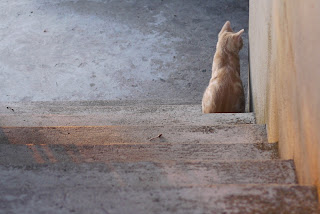 I solve to crop the photo quite a bit, this can be done by making a rectangle selection and choosing "Crop to selection", in my case I set the selection to have 3:2 proportions.

At this point I feel that image needed to be sharpened a bit, I've done this using a special filter I have in GIMP, it is equivalent to unsharp mask filter in other applications with support for darkening and enlightening edges so that they 'pop up' more, giving the image those contrasty edges that are pleasant for the eyes while avoiding some artifact given by normal sharpening tools. However, over doing it will make the picture look artificial by casting auras/halos around edges in a similar fashion to what happens using normal sharpening filter. Using a large radius mask will give a bump in local contrast, if the strength of the filter is too much it may give some halos similar to those of HDR images, I feel this image could benefit from some slight improvement of local contrast, so here it goes, radius 64 with 0.5 strength.
If your application can only lighten the edges (most do, photoshop and paint shop pro should have it working like the GIMP filter by now though), you can apply the filter to the normal image, invert the colors, apply it again, and invert to the original (you can test this by drawing a light gray rectangle on a dark gray background and applying the filter).
Well, the picture has now a bit more contrast, however, in the picture the sun was setting, and it lacks the harsh light of the sunset, I wanted to enhance a bit that mood as a pretext to explain a bit the curves tool.
 I applied the shown curve modifier to the image
This is probably one of the most basic curves you will use, understanding how to use curves tool requires you to understand what a image histogram is, I won't be explaining that here right now, but you can get an idea that it shows the amount of pixels at a given light level (if it is a luminance histogram).
 The light gray diagonal line shown the original curve, the black line shows my change.
It gives an increase of contrast (as the slope is bigger) in the middle area
Reduces a bit the exposure (darkening the photo) as most of the curve is under the original one
Clips the shadows a bit (by starting under the original line).
A side effect of increasing the contrast is that it increases the saturation (color contrast) as well, this is because the curve is not applied to luminance alone but to Value channel, that can be seen as an average of RGB, this gives me a stronger orange/red tone on the stairs, thus increasing the idea of the sun light hitting the stairs there.
I suggest you play with the curves tool, it can be very powerful to either correct the colors, enhance them or simply create surrealistic effect.
 It depends of what application you are using to edit your photos, but you can apply the curves tool not only to luminance (Y channel/Value channel), but to other components as well.... from RGB ones to HSV or HSL or even CMYK channels. Here I bumped the red channel a bit and reduced the blue channel a bit giving it more warmer tones
Hope you liked this small showcase of post processing tools.
Play with the tools you have on your application, if you are new to this and have Windows on your computer, I suggest Paint.NET as a starting point, it is free, simple and intuitive.
If you like to see something more deeply explained feel free to ask.
Have fun!
I though of starting with the basics of post processing, this is not how to take a photo, what background is best for a given subject or what composition is best for a given scene, this is meant to be a simple showcase of the tools available in imaging software and how they affect the image itself.
I will NOT be explaining how 'light room' (same process as darkroom from film times, but for processing digital RAW data) works in this entry, I leave that for another time.
I'll be using GIMP, it is a free application and give me quite some tools for enhancing my photos, I use some python Filters that I installed a long time ago, but for sake of compatibility I'll use only the most common ones than can be find on other imaging application. This is not a GIMP tutorial though, so you should know what/where tools are, names of tools don't change a lot from application to application, so this shouldn't be too troublesome.
First we need to start with a photo... well ... I have a bunch of them so I'll just pick one at random.
 I like this shot, while it wasn't the best taken one, it provides a nice start point to show some post processing tools.
Let's start with composing the shot... usually you should prevent this by correctly frame the photo when shooting, but sometimes, either because you didn't had the time to do it or you did not perceive the scene well, framing will not be as good as you wanted.
 I feel like this shot needs to be rotated to level those stairs with the picture frame, there is a rotate tool available, it allows you to rotate the image at any degree your want. In Gimp you can also overlay guide lines by dragging the ruler bar into the image itself. You may want to expand image canvas to fit layer size.
I think I over did it a bit, well, this is only a simple tutorial with no artistic intentions.

 I solve to crop the photo quite a bit, this can be done by making a rectangle selection and choosing "Crop to selection", in my case I set the selection to have 3:2 proportions.
At this point I feel that image needed to be sharpened a bit, I've done this using a special filter I have in GIMP, it is equivalent to unsharp mask filter in other applications with support for darkening and enlightening edges so that they 'pop up' more, giving the image those contrasty edges that are pleasant for the eyes while avoiding some artifact given by normal sharpening tools. However, over doing it will make the picture look artificial by casting auras/halos around edges in a similar fashion to what happens using normal sharpening filter. Using a large radius mask will give a bump in local contrast, if the strength of the filter is too much it may give some halos similar to those of HDR images, I feel this image could benefit from some slight improvement of local contrast, so here it goes, radius 64 with 0.5 strength.
If your application can only lighten the edges (most do, photoshop and paint shop pro should have it working like the GIMP filter by now though), you can apply the filter to the normal image, invert the colors, apply it again, and invert to the original (you can test this by drawing a light gray rectangle on a dark gray background and applying the filter).
Well, the picture has now a bit more contrast, however, in the picture the sun was setting, and it lacks the harsh light of the sunset, I wanted to enhance a bit that mood as a pretext to explain a bit the curves tool.

This is probably one of the most basic curves you will use, understanding how to use curves tool requires you to understand what a image histogram is, I won't be explaining that here right now, but you can get an idea that it shows the amount of pixels at a given light level (if it is a luminance histogram).
 The light gray diagonal line shown the original curve, the black line shows my change.
It gives an increase of contrast (as the slope is bigger) in the middle area
Reduces a bit the exposure (darkening the photo) as most of the curve is under the original one
Clips the shadows a bit (by starting under the original line).
A side effect of increasing the contrast is that it increases the saturation (color contrast) as well, this is because the curve is not applied to luminance alone but to Value channel, that can be seen as an average of RGB, this gives me a stronger orange/red tone on the stairs, thus increasing the idea of the sun light hitting the stairs there.
I suggest you play with the curves tool, it can be very powerful to either correct the colors, enhance them or simply create surrealistic effect.
 It depends of what application you are using to edit your photos, but you can apply the curves tool not only to luminance (Y channel/Value channel), but to other components as well.... from RGB ones to HSV or HSL or even CMYK channels. Here I bumped the red channel a bit and reduced the blue channel a bit giving it more warmer tones
 Hope you liked this small showcase of post processing tools.
Play with the tools you have on your application, if you are new to this and have Windows on your computer, I suggest Paint.NET as a starting point, it is free, simple and intuitive.
If you like to see something more deeply explained feel free to ask.
Have fun!
Tuesday, August 30, 2011


Wednesday, August 24, 2011
Nokia 5800 XpressMusic - Camera
Because my GH1 solved to commit suicide (I may post the repair process later - once I get it repaired), I solve to check what my 'old' 5800 was capable when it came to photo image quality (if you can call it that).
**WARNING - RANT ABOUT NOKIA AHEAD**
After N95, Nokia did not release any mobile phone worth of it's price. Anne update was a mess, most of the devices expected to have it as an update are still waiting for it, battery drain issues (probably processes running astray), etc. - I talk about this update because it also bring some extras to N8 camera (leaving E7, C7 and C6-01 in the cold - hardware could be the reason, though).
Belle is now arriving to the market, the interface useability looks like a copy of android in many points, but I'm okay with that. But thing is ... Symbian is dead, mostly because it got too bloated and fragmented to be maintained by a single company, the attempt to open the code with S^3 failed and now Nokia tries to make it pretty (Yay for marketing!) so it can sell devices while preparing the WP7 ones.
I wonder how Nokia will survive on the market with 250~300€ devices that are almost identical to 80~100€ android devices (except for the screen, Nokia has the upper-hand on that part - but in RAM is the other way around)
** END OF RANT **
Well, I went ahead and ranted about it, back to the camera stuff, 5800 is plagued with something called JPEG compression... Noise reduction doesn't help obviously, and when it comes to ISO let's say that it's better to stick to 100 even though there is no exact control over it. And that's exactly the point, when a digital camera is bad, you can usually control the variables to make it a bit better, 5800 allows for 3 levels of ISO: low (up to 100), medium (up to 400) and high (up to 800). So far so good, since you can't control lens aperture (f/2.8 by the way), nor focal length (3.7mm or around 40mm in 35mm film terms) the only thing left to control exposure is the time, the exposure time is not tweak-able and that's quite a pain: you can set the camera to night mode and get the shutter to go to up 1/5s, but is not exactly accurate and it could be longer like 1s or so (assuming you could put the phone on a resting surface).
So, what else? Well, some guys noticed the JPEG artifacts and hacked the phone configurations to obtain the 'goodies', that was quite good indeed, but hacking is not for everyone and there is also the risk that you break something up.
I tried to override the camera exposure time by making an app for the phone, sadly Symbian is a nightmare to program, with bloated and confusing APIs, even installing the IDE is a challenge by itself (not to mention that I end up by having it crash all the time). So the only thing that would do was python for Symbian, it's a lot more direct to the stuff, but the APIs are limited, I noticed it has a camera API, so I gave it a try.
Sadly python only allows for the basic access to the camera, using the profiles (night, sports, etc) in camera setup. So ... what else? ... hmmm, did someone though of the same but had experience in programming stuff in low level for Symbian? Apparently yes, it's called CameraPro an application that does what's expected to do.
Here goes a few comparison crops so that you can have an idea, I disabled flash in all modes (click on the photo to see it at full size):

As you can see Auto mode is horrendous, it picks ISO 600 (592 to be exact with 1/17s exposure), giving a desaturated photo, filled with blurriness from the noise reduction acting up. There is also a noticeable green tint, specially on the right edge of the photo, probably some electromagnetic interference in the sensor from the phone internal wiring.
The second column, has a tweak from my side, I pick night mode, and ISO medium setting, It gave me an ISO 300 (ISO296, 1/6s), it's noticeable better, the green tint is lower, the detail is a lot better, but there is still some annoying 'mushiness' on the image.
On the third column, I tweaked it, further limiting the ISO setting to low, surprisingly, while I set night mode the camera gave me ISO97 and 1/17s exposure, since it looked dark with the first attempt (I can only check the EXIF on computer) I set the EV to +2, hoping that it got it right, but no, same result: an underexposed photo, not exactly bad it terms of detail, but shadow noise is noticeable, and if I had post processed it to correct the exposure I would have a noise filled photo.
The last column shows the result of CameraPro with the settings: ISO100, Exposure mode: Very Long, JPEG quality at 100, the resulting photo reports in EXIF: ISO 97, 0.52sec exposure (1/2s). It's not hard to see that quality wise, while not perfect, it's a great result when comparing with the other photos. Video seems to have so extra tweaks on it as well, but I haven't tested it.
Well... this just means that the device hardware manufacturer didn't do a good job with the software, requiring third party software to take the best of the hardware.
This reminds me of Canon cameras and CHDK... thing is ALL digital cameras adquire raw signal in the sensor, some sensor chipsets have the JPEG engine inside (usually tweak-able), but for most it is possible to acquire the RAW data, manufacturers choose to not implement RAW feature on compact cameras, when it would increase the camera value for the enthusiasts... Oh well... Let's wait for camera with 50MP 1/8" sensors and 50x Zoom lens and then complain that my 5800 takes better photos :/ (for the ones that don't get the hint, I'm exaggerating)
**WARNING - RANT ABOUT NOKIA AHEAD**
After N95, Nokia did not release any mobile phone worth of it's price. Anne update was a mess, most of the devices expected to have it as an update are still waiting for it, battery drain issues (probably processes running astray), etc. - I talk about this update because it also bring some extras to N8 camera (leaving E7, C7 and C6-01 in the cold - hardware could be the reason, though).
Belle is now arriving to the market, the interface useability looks like a copy of android in many points, but I'm okay with that. But thing is ... Symbian is dead, mostly because it got too bloated and fragmented to be maintained by a single company, the attempt to open the code with S^3 failed and now Nokia tries to make it pretty (Yay for marketing!) so it can sell devices while preparing the WP7 ones.
I wonder how Nokia will survive on the market with 250~300€ devices that are almost identical to 80~100€ android devices (except for the screen, Nokia has the upper-hand on that part - but in RAM is the other way around)
** END OF RANT **
Well, I went ahead and ranted about it, back to the camera stuff, 5800 is plagued with something called JPEG compression... Noise reduction doesn't help obviously, and when it comes to ISO let's say that it's better to stick to 100 even though there is no exact control over it. And that's exactly the point, when a digital camera is bad, you can usually control the variables to make it a bit better, 5800 allows for 3 levels of ISO: low (up to 100), medium (up to 400) and high (up to 800). So far so good, since you can't control lens aperture (f/2.8 by the way), nor focal length (3.7mm or around 40mm in 35mm film terms) the only thing left to control exposure is the time, the exposure time is not tweak-able and that's quite a pain: you can set the camera to night mode and get the shutter to go to up 1/5s, but is not exactly accurate and it could be longer like 1s or so (assuming you could put the phone on a resting surface).
So, what else? Well, some guys noticed the JPEG artifacts and hacked the phone configurations to obtain the 'goodies', that was quite good indeed, but hacking is not for everyone and there is also the risk that you break something up.
I tried to override the camera exposure time by making an app for the phone, sadly Symbian is a nightmare to program, with bloated and confusing APIs, even installing the IDE is a challenge by itself (not to mention that I end up by having it crash all the time). So the only thing that would do was python for Symbian, it's a lot more direct to the stuff, but the APIs are limited, I noticed it has a camera API, so I gave it a try.
Sadly python only allows for the basic access to the camera, using the profiles (night, sports, etc) in camera setup. So ... what else? ... hmmm, did someone though of the same but had experience in programming stuff in low level for Symbian? Apparently yes, it's called CameraPro an application that does what's expected to do.
Here goes a few comparison crops so that you can have an idea, I disabled flash in all modes (click on the photo to see it at full size):

As you can see Auto mode is horrendous, it picks ISO 600 (592 to be exact with 1/17s exposure), giving a desaturated photo, filled with blurriness from the noise reduction acting up. There is also a noticeable green tint, specially on the right edge of the photo, probably some electromagnetic interference in the sensor from the phone internal wiring.
The second column, has a tweak from my side, I pick night mode, and ISO medium setting, It gave me an ISO 300 (ISO296, 1/6s), it's noticeable better, the green tint is lower, the detail is a lot better, but there is still some annoying 'mushiness' on the image.
On the third column, I tweaked it, further limiting the ISO setting to low, surprisingly, while I set night mode the camera gave me ISO97 and 1/17s exposure, since it looked dark with the first attempt (I can only check the EXIF on computer) I set the EV to +2, hoping that it got it right, but no, same result: an underexposed photo, not exactly bad it terms of detail, but shadow noise is noticeable, and if I had post processed it to correct the exposure I would have a noise filled photo.
The last column shows the result of CameraPro with the settings: ISO100, Exposure mode: Very Long, JPEG quality at 100, the resulting photo reports in EXIF: ISO 97, 0.52sec exposure (1/2s). It's not hard to see that quality wise, while not perfect, it's a great result when comparing with the other photos. Video seems to have so extra tweaks on it as well, but I haven't tested it.
Well... this just means that the device hardware manufacturer didn't do a good job with the software, requiring third party software to take the best of the hardware.
This reminds me of Canon cameras and CHDK... thing is ALL digital cameras adquire raw signal in the sensor, some sensor chipsets have the JPEG engine inside (usually tweak-able), but for most it is possible to acquire the RAW data, manufacturers choose to not implement RAW feature on compact cameras, when it would increase the camera value for the enthusiasts... Oh well... Let's wait for camera with 50MP 1/8" sensors and 50x Zoom lens and then complain that my 5800 takes better photos :/ (for the ones that don't get the hint, I'm exaggerating)
Wednesday, June 15, 2011
Playing with blender (UPDATE v2)
I've always looked at blender as a complex and hard to use tool, at least when compared with Art Of Illusion, however it is a very powerful and complete tool and since my trouble with using it is the lack of experience, I solve to give it a try and create a 3D model of one of my favorite cars, the VW Polo.
After 2 hours fighting with the keyboard shortcuts, cameras and lights, I managed to get a very nice model of the VW Polo overall shape done, I rendered it, and it looked quite nice... The metal of the car body was complete.
I saved and then quit, thinking in continue it later.
A few minutes later I though in render it and show it on the blog, so, I run blender, load recent file "VWPolo.blend", and.... only the first save was kept, so ... only the front of the car!
I tried the recover thing blend has... without success, I searched the entire hardrive for blender files ... nothing... It vanished.

I obviously give up of doing it on blender... or on anywhere else (this was actually the second attempt of doing the Polo, the first was on AoI... it crashed when I saved)... most likely my luck will strike again and delete it no mater what...
UPDATE:
After struggling into understanding what happened, I found out that after the first save, blender asks for file overwrite when saving... the way it does is by showing a dropdown menu... if you move the mouse out of the dropdown menu it disapears and file is not saved D:
Well, as a bonus I did a low poly version of the 3d model I attempted earlier:

This is my first attempt with textures on blender... pretty easy... but a labyrinth of menus is what it takes to do it.
Texture itself was mostly a side view photo and brushes on GIMP, not exactly the most refined one, but it serves as a nice test.
Perhaps I try M3G export and start doing JSR 184 enabled apps ...
UPDATE 2:
And I did...
On my Nokia 5800 XpressMusic runs at 14~16 fps (if I run with fullscreen, without J2ME Commands, it will probably be less) .... hmmm ... maybe I should do some little game. Probably I won't...
After 2 hours fighting with the keyboard shortcuts, cameras and lights, I managed to get a very nice model of the VW Polo overall shape done, I rendered it, and it looked quite nice... The metal of the car body was complete.
I saved and then quit, thinking in continue it later.
A few minutes later I though in render it and show it on the blog, so, I run blender, load recent file "VWPolo.blend", and.... only the first save was kept, so ... only the front of the car!
I tried the recover thing blend has... without success, I searched the entire hardrive for blender files ... nothing... It vanished.

This is what survived ... FML
I obviously give up of doing it on blender... or on anywhere else (this was actually the second attempt of doing the Polo, the first was on AoI... it crashed when I saved)... most likely my luck will strike again and delete it no mater what...
UPDATE:
After struggling into understanding what happened, I found out that after the first save, blender asks for file overwrite when saving... the way it does is by showing a dropdown menu... if you move the mouse out of the dropdown menu it disapears and file is not saved D:
Well, as a bonus I did a low poly version of the 3d model I attempted earlier:

Around 1000 triangles and a 512x512 UV mapped texture
This is my first attempt with textures on blender... pretty easy... but a labyrinth of menus is what it takes to do it.
Texture itself was mostly a side view photo and brushes on GIMP, not exactly the most refined one, but it serves as a nice test.
Perhaps I try M3G export and start doing JSR 184 enabled apps ...
UPDATE 2:
And I did...
 |
| Running on emulator |
On my Nokia 5800 XpressMusic runs at 14~16 fps (if I run with fullscreen, without J2ME Commands, it will probably be less) .... hmmm ... maybe I should do some little game. Probably I won't...
Tuesday, March 8, 2011
Super Scribble (EDITED: 10/03/2011 v2)
EDIT:
You can download the latest package installer .sis file from here:
Downloads - super-scribble - Project Hosting on Google Code
If you have a Nokia with a touchscreen and a Symbian OS and ever tried Python I'm sure you know Scribble, a small sample application that shows Python touchscreen interaction by providing a simple doodling application.
One of the things you may have noticed it, it's the limited feature set, you have an eraser and a pencil, you also have a color picker from where you can pick a few colors, thankfully you can save the doodles or notes you make on it.
There are other applications for Symbian touch devices that deliver some similar features, some allow for zoom and a better color picker, but nothing else...
Here are some of the doodles I did on scribble's unmodified state:


As you may have noticed, they are only B&W pictures, this is because rarely any of the colors provided are truly useful.
I've used scribble for quite some time and this week I spent my time practicing Python and PyS60 API.
I messed up with pretty much everything on Scribble's source code, so I added a number of features to it, namely mix brush, smudge tool, opacity, RGB sliders to pick color and brush color history. All this while trying to maintain the performance and smoothness of the application.
With those changes I manage to do these doodles in little time:


Of course there is still room for improvement, like the ability to open and edit images (and by consequence the support for bigger images and removal of the white stripe on the bottom of the images)
You can download the application (sis and python source) from here (tested in Nokia 5800 XpressMusic, should work in N97, 5530, 5230, X6 or any other Symbian touch device that has PyS60 2.0.0 installed and working)
I'll perhaps post a video later explaining what each of the interface areas does... If you're going to try it, you should at least know that touching the red bordered rectangle on the will pick the rectangle fill color for the brush.
Have fun!
PS:
R.I.P. Nokia, if you didn't know Nokia it's now a Microsoft's partner and while Nokia isn't dead, Symbian S60 5th and S^3 will kinda meet a dead end, S40 will continue to survive in lower end devices where nokia still have a valuable market share.
EDIT (10/03/2011):
I improved it (currently version 0.6.x) but didn't released it yet - probably will release a video together with the new version (that will probably be version 0.7.x).
v0.6.0 features the following additions:
Stay tuned for updates :]
You can download the latest package installer .sis file from here:
Downloads - super-scribble - Project Hosting on Google Code
If you have a Nokia with a touchscreen and a Symbian OS and ever tried Python I'm sure you know Scribble, a small sample application that shows Python touchscreen interaction by providing a simple doodling application.
One of the things you may have noticed it, it's the limited feature set, you have an eraser and a pencil, you also have a color picker from where you can pick a few colors, thankfully you can save the doodles or notes you make on it.
There are other applications for Symbian touch devices that deliver some similar features, some allow for zoom and a better color picker, but nothing else...
Here are some of the doodles I did on scribble's unmodified state:



As you may have noticed, they are only B&W pictures, this is because rarely any of the colors provided are truly useful.
I've used scribble for quite some time and this week I spent my time practicing Python and PyS60 API.
I messed up with pretty much everything on Scribble's source code, so I added a number of features to it, namely mix brush, smudge tool, opacity, RGB sliders to pick color and brush color history. All this while trying to maintain the performance and smoothness of the application.
With those changes I manage to do these doodles in little time:


Of course there is still room for improvement, like the ability to open and edit images (and by consequence the support for bigger images and removal of the white stripe on the bottom of the images)
You can download the application (sis and python source) from here (tested in Nokia 5800 XpressMusic, should work in N97, 5530, 5230, X6 or any other Symbian touch device that has PyS60 2.0.0 installed and working)
I'll perhaps post a video later explaining what each of the interface areas does... If you're going to try it, you should at least know that touching the red bordered rectangle on the will pick the rectangle fill color for the brush.
Have fun!
PS:
R.I.P. Nokia, if you didn't know Nokia it's now a Microsoft's partner and while Nokia isn't dead, Symbian S60 5th and S^3 will kinda meet a dead end, S40 will continue to survive in lower end devices where nokia still have a valuable market share.
EDIT (10/03/2011):
I improved it (currently version 0.6.x) but didn't released it yet - probably will release a video together with the new version (that will probably be version 0.7.x).
v0.6.0 features the following additions:
- Support for any size of drawing (as long as the memory handles it)
- Support for Zoom
- Move tool (allows one to move the canvas by dragging it)
- Color picker tool, picks a tool from canvas to use in brush
Stay tuned for updates :]
Saturday, December 11, 2010
Tablet + Windows 7 x64 = riiiiiiight!
Well... if you have a Trust, Genius, Aiptek, Nisis, etc. tablet, most likely it is made by a Taiwan company called Waltop.
That I have said before on a previous entry, I also recommended taking the drivers from Waltop website (they have x86 and x64 versions), that I can still recommend, however if you're using GIMP on Windows 7 x64 (and I guess Photoshop as well, given the number of threads on several forums) you may notice that, no matter how powerful your PC is or what driver version you use, there is a annoying lag between brush strokes, like the mouse pointer is "holding a dog leash to the brush".
If you're using a Wacom Tablet you may have the same issue.
Luckily this seems to be a Windows problem (aren't you glad?), you have to disable the gestures and flicks that Windows 7 activates by default, you just go to Control Panel -> Hardware and Sound -> Pen and Touch
There, in Pen Options tab, you go to the avaliable settings for each pen action entry and disable each of them where possible, then un-check the checkboxes under Pen buttons, also, in Flicks tab, disable the flicks usage.
There .... GIMP is working :] Fun fact: Open Canvas 1.1 beta 72 revision 1 works flawlessly even if drivers don't work correctly under windows (this is true for windows XP, Vista and 7 - In XP it worked WITHOUT drivers installed) ... Now that's what i call voodoo software... :]
If you're using a Wacom Tablet you may have the same issue.
Luckily this seems to be a Windows problem (aren't you glad?), you have to disable the gestures and flicks that Windows 7 activates by default, you just go to Control Panel -> Hardware and Sound -> Pen and Touch
There, in Pen Options tab, you go to the avaliable settings for each pen action entry and disable each of them where possible, then un-check the checkboxes under Pen buttons, also, in Flicks tab, disable the flicks usage.
There .... GIMP is working :] Fun fact: Open Canvas 1.1 beta 72 revision 1 works flawlessly even if drivers don't work correctly under windows (this is true for windows XP, Vista and 7 - In XP it worked WITHOUT drivers installed) ... Now that's what i call voodoo software... :]
Friday, December 10, 2010
Xmas list 2.... riiiiiight.... (updated)
Since i did adquire some gadgetery goods since last time, i feel like it's a good idea to update this ...
Obsolete entries from my last xmas list:
So ... anyone with a heavy felling in the pocket? I know, i know: "Keep dreaming...".
EDIT:
@neca,
It's striked down ... unless your browser sucks or the feeds ignore it (I checked that out to avoid confusion) and you don't see that >_>
At the time A350 was a good camera (and i didn't buy it), Canon had 450D ... and that would be a nice choice as well...
In any case i currently have a Panasonic Lumix DMC-GH1 (hacked firmware) + 14-140mm lens + 20mm f/1.7 lens ... a nice small combo for photography that does terrific videos as well - but that Voigtlaender 25mm f/0.95 would sure be handy in extreme low light :]
Currently i actually move away from all Sony and Apple products ... they use several technics to fidelize (not an english word, yay! *sarcasm*) and limit the client to their brands ... and that i cannot accept.
Obsolete entries from my last xmas list:
Nokia 5800 XpressMusicSony Alpha 350kSony HDR-SR11ESamsung SyncMaster 2233SWIntuos3 A5 Wide USB "Special Edition"
- Intuos4 Wireless (for the price this costs i'd rather have the pandora)
- Pandora Handheld
- Voigtlaender 25mm f/0.95 for MFT
- Panasonic G Vario 100-300mm f/4.0-5.6
- LUMIX G VARIO 7-14mm F4.0 ASPH
- Lensbaby Composer with Tilt Transformer for Micro 4/3rds
- 62mm Polarizer filter
- Flash Hot Shoe cover with spirit bubble level (compact version)
- Alloy Shark 3ch (Portuguese store link)
- Professor Rubik's Cube (5x5x5)
- Manetic NeoCube (This seems to be the best one and this the most reliable store)

So ... anyone with a heavy felling in the pocket? I know, i know: "Keep dreaming...".
EDIT:
@neca,
It's striked down ... unless your browser sucks or the feeds ignore it (I checked that out to avoid confusion) and you don't see that >_>
At the time A350 was a good camera (and i didn't buy it), Canon had 450D ... and that would be a nice choice as well...
In any case i currently have a Panasonic Lumix DMC-GH1 (hacked firmware) + 14-140mm lens + 20mm f/1.7 lens ... a nice small combo for photography that does terrific videos as well - but that Voigtlaender 25mm f/0.95 would sure be handy in extreme low light :]
Currently i actually move away from all Sony and Apple products ... they use several technics to fidelize (not an english word, yay! *sarcasm*) and limit the client to their brands ... and that i cannot accept.
Monday, December 6, 2010
Artificial Bokeh
Bokeh... better use wikipedia explanation:
In photography, bokeh is the blur, or the aesthetic quality of the blur, in out-of-focus areas of an image, or "the way the lens renders out-of-focus points of light."
Now, this is often used to enhance a subject or give a dreamy or surreal look to a picture, in portraits is often used to achieve a smooth background, and while it's not always desired it appears because of the so called circle of confusion and depth of field (http://en.wikipedia.org/wiki/Depth_of_field).
For achieve the blur of out of focused areas one must often use lens with big apertures or/and a good focal length, and those are usually expensive, heavy, big or a combination of the three... The other way of achieve that effect is to simulate it artificially... and that it's kinda tricky, mainly because the original image to which you want to apply it doesn't have the entire information to do it....
The simplest way to increase blur or create blur to given out of focus areas would be when create miniature looking photos of a city, this is possible because cities are often layered in a simple plane and an overlayed blured picture using a gradient as mask does the trick in most of the cases....
Extending the concept, one can create a mask to protect focused areas and blur the rest, but bokeh doesn't have a regular radius blur, the bigger the distance from the focus plane is the blurrier the area looks, and that brings us to a depth map/mask ... sadly this is not easy to create, nor easy to apply as a mechanism of interpreting the depth must exist.
Taking care of a mechanism for doing it properly, i introduce you to GIMP Focus Blur Filter Plug-in (windows version)... Now how does that plug-in perform.... wonderfully i must say... sadly my 20mm f/1.7, while has a big aperture, sometimes it's not quite enough to blur the background as i wished it would do... so i searched and found this pearl... it is quite awesome to apply... the drawbacks?
I point two: It will take its time to be applied (in a 8MP image might take like 10mins!) and you really need a depth map if you want to see awesome results :]
By the way, black means focused, white means fully unfocused.... in the middle ... is in the middle :] Well, to help you out with the depth map, i'll point you to another plugin: Depth map Plugin (windows version) ... It will create a depth map, but it has a requirement: You need to take two stereoscopic images, and that on moving stuff is only possible with two cameras (preferably identical)... it works pretty well, but you might want to retouch the depth map a bit for best results... Here goes an example of what you could do (Halloween Gothic Bride for the win): The original (well, not quite original, as this was cropped, noise was reduced, color corrected, details sharpened and reduced on the end for web view): The depth map i drawn (clumsy for the win):
 The end result using Flat model, 25px radius blur, 5px radius shine:
 This is simply the best plug-in I've ever found - and i don't even explored everything it has to give - this fella is just above tone mapping filter :]
For achieve the blur of out of focused areas one must often use lens with big apertures or/and a good focal length, and those are usually expensive, heavy, big or a combination of the three... The other way of achieve that effect is to simulate it artificially... and that it's kinda tricky, mainly because the original image to which you want to apply it doesn't have the entire information to do it....
The simplest way to increase blur or create blur to given out of focus areas would be when create miniature looking photos of a city, this is possible because cities are often layered in a simple plane and an overlayed blured picture using a gradient as mask does the trick in most of the cases....
Extending the concept, one can create a mask to protect focused areas and blur the rest, but bokeh doesn't have a regular radius blur, the bigger the distance from the focus plane is the blurrier the area looks, and that brings us to a depth map/mask ... sadly this is not easy to create, nor easy to apply as a mechanism of interpreting the depth must exist.
Taking care of a mechanism for doing it properly, i introduce you to GIMP Focus Blur Filter Plug-in (windows version)... Now how does that plug-in perform.... wonderfully i must say... sadly my 20mm f/1.7, while has a big aperture, sometimes it's not quite enough to blur the background as i wished it would do... so i searched and found this pearl... it is quite awesome to apply... the drawbacks?
I point two: It will take its time to be applied (in a 8MP image might take like 10mins!) and you really need a depth map if you want to see awesome results :]
By the way, black means focused, white means fully unfocused.... in the middle ... is in the middle :] Well, to help you out with the depth map, i'll point you to another plugin: Depth map Plugin (windows version) ... It will create a depth map, but it has a requirement: You need to take two stereoscopic images, and that on moving stuff is only possible with two cameras (preferably identical)... it works pretty well, but you might want to retouch the depth map a bit for best results... Here goes an example of what you could do (Halloween Gothic Bride for the win): The original (well, not quite original, as this was cropped, noise was reduced, color corrected, details sharpened and reduced on the end for web view):
 The depth map i drawn (clumsy for the win):
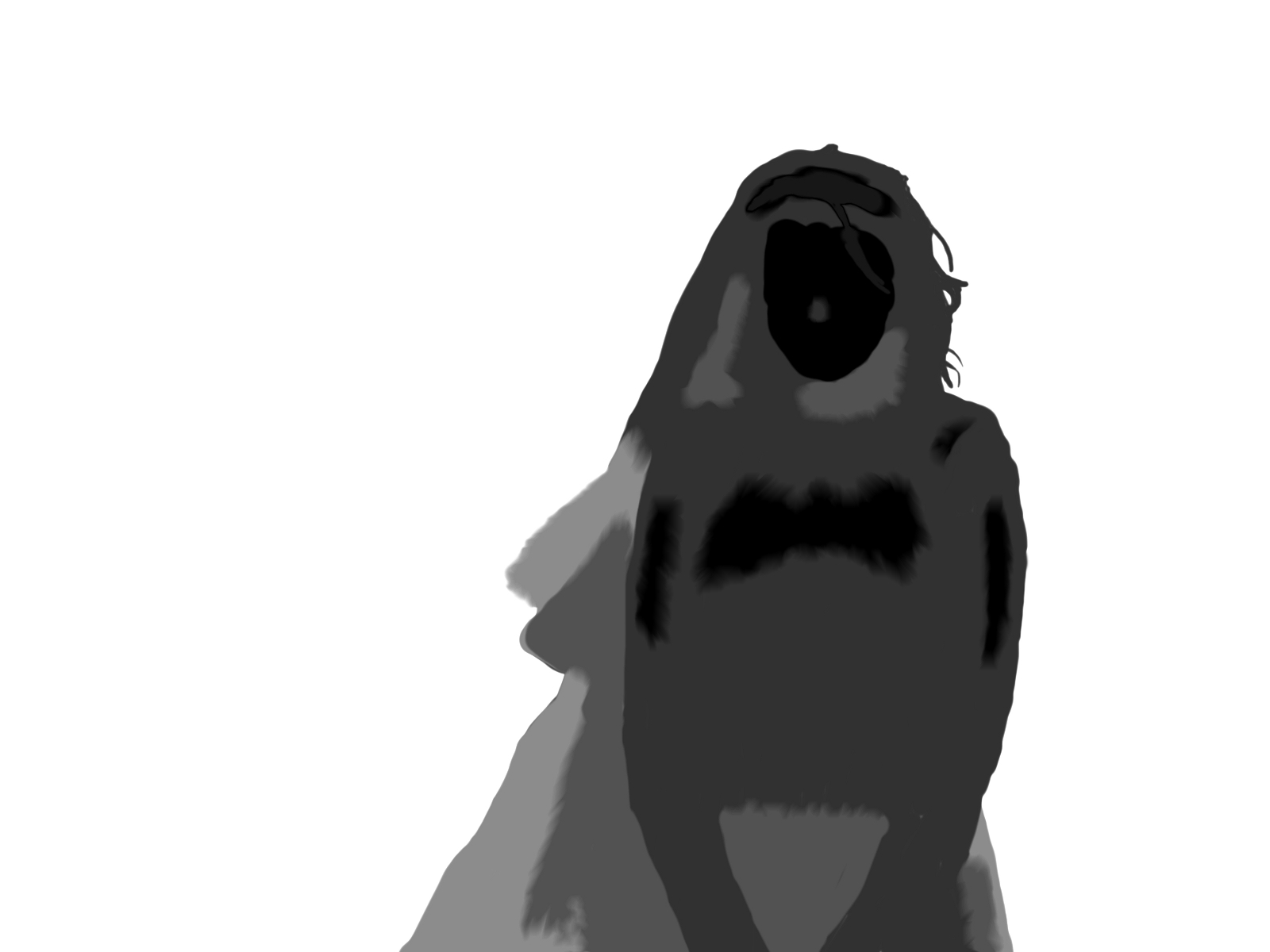 The end result using Flat model, 25px radius blur, 5px radius shine:
 This is simply the best plug-in I've ever found - and i don't even explored everything it has to give - this fella is just above tone mapping filter :]
Tuesday, November 16, 2010
Line of code of the day #5
Another LOCOTD.... just for me to remember those nice *cough cough* code lines that i come around from time to time.... i'm currently working as a trainee (until February), i'm currently implementing a custom featured content management system (CMS), i'm using php, mySQL, xhtml, css and a bit of JS for some slideshows... but this LOCOTD is about SQL ...
Store Procedures (SPs), as you may not know, are supported by mySQL for quite some time, however not quite perfectly as you might expect.... On SPs, you basically build a wrap box around one or more SQL statements, you can set variables, use the usual SQL stuff.... in my case i was using a SELECT, like i did for the rest of the dozens of SPs i did before, i was implementing a page like feature in the CMS, for that LIMIT clause is god send, but guess what.... in SPs you can't use non-constant integers in LIMIT parameters... yes.... you can use the arguments of the SP anywhere, except on the LIMIT clause...
So ... "How to solve it?" that would be the question... one way would be using a prepared statement, like this:
CREATE PROCEDURE `fooTable`.`sp_fooTableList` ( limit_arg int )
BEGIN
SET @sql = concat('SELECT * FROM `fooTable` LIMIT ', limit_arg);
PREPARE STMT FROM @sql;
EXECUTE stmt;
END
An obvious problem with this, is that it broken the extra security provided by SPs... but it is a valid workaround.... quite simple as well.... but because this prepared statement kinda defeat the purpose of having a nicely wrapped SQL statement, i found a way of doing it without recurring to it, i say found and not invented, credit goes to Gert Brigsted, it's easy to follow and understand how and why it works:
CREATE PROCEDURE `fooDB`.`sp_fooTableList` ( limit_start, limit_end )
BEGIN
SET @rownum:=0;
SELECT *
FROM (
SELECT ( @rownum:=@rownum+1) AS Rownumber, `fooTable`.*
FROM `fooTable`
ORDER BY `fooTable`.`mooCol` DESC
) AS t
WHERE Rownumber > limit_start AND Rownumber <= limit_end;
END
It looks messy, but it works... sure, it has some impact on performance, but that's the price to pay for security... until LIMIT clause accepts variables as parameters.
Perhaps you are thinking, "That surely is, or will be, fixed in current iterations of mySQL" ... you are right it is, in versions 5.5.6 and 6.0.14, it is 'fixed' ... But not all servers allow you to change mySQL version installed... so, I guess you may run into this problem and have to use one of the above workarounds...
As a side note, this was submitted as bug #11918 by 13 July 2005 and 'solved' by 24 September 2010 .... more than 5 years to 'fix' this 'bug' ... i use quotes because wasn't exactly a bug but more like a non-feature...
Hope it helps someone out there bashing at "ERROR 1064 (42000): You have an error in your SQL syntax; check the manual that corresponds to your MySQL server version for the right syntax to use near: s_limit, e_limit;"
Store Procedures (SPs), as you may not know, are supported by mySQL for quite some time, however not quite perfectly as you might expect.... On SPs, you basically build a wrap box around one or more SQL statements, you can set variables, use the usual SQL stuff.... in my case i was using a SELECT, like i did for the rest of the dozens of SPs i did before, i was implementing a page like feature in the CMS, for that LIMIT clause is god send, but guess what.... in SPs you can't use non-constant integers in LIMIT parameters... yes.... you can use the arguments of the SP anywhere, except on the LIMIT clause...
So ... "How to solve it?" that would be the question... one way would be using a prepared statement, like this:
CREATE PROCEDURE `fooTable`.`sp_fooTableList` ( limit_arg int )
BEGIN
SET @sql = concat('SELECT * FROM `fooTable` LIMIT ', limit_arg);
PREPARE STMT FROM @sql;
EXECUTE stmt;
END
An obvious problem with this, is that it broken the extra security provided by SPs... but it is a valid workaround.... quite simple as well.... but because this prepared statement kinda defeat the purpose of having a nicely wrapped SQL statement, i found a way of doing it without recurring to it, i say found and not invented, credit goes to Gert Brigsted, it's easy to follow and understand how and why it works:
CREATE PROCEDURE `fooDB`.`sp_fooTableList` ( limit_start, limit_end )
BEGIN
SET @rownum:=0;
SELECT *
FROM (
SELECT ( @rownum:=@rownum+1) AS Rownumber, `fooTable`.*
FROM `fooTable`
ORDER BY `fooTable`.`mooCol` DESC
) AS t
WHERE Rownumber > limit_start AND Rownumber <= limit_end;
END
It looks messy, but it works... sure, it has some impact on performance, but that's the price to pay for security... until LIMIT clause accepts variables as parameters.
Perhaps you are thinking, "That surely is, or will be, fixed in current iterations of mySQL" ... you are right it is, in versions 5.5.6 and 6.0.14, it is 'fixed' ... But not all servers allow you to change mySQL version installed... so, I guess you may run into this problem and have to use one of the above workarounds...
As a side note, this was submitted as bug #11918 by 13 July 2005 and 'solved' by 24 September 2010 .... more than 5 years to 'fix' this 'bug' ... i use quotes because wasn't exactly a bug but more like a non-feature...
Hope it helps someone out there bashing at "ERROR 1064 (42000): You have an error in your SQL syntax; check the manual that corresponds to your MySQL server version for the right syntax to use near: s_limit, e_limit;"
Wednesday, August 26, 2009
Canon Power features...
I don't own a Canon camera... but for the ones that own one and have that feeling that the camera could gain with some extra customizable options in menus, or just want to try advanced photo technics without have to pay a premium price for such features, CHDK might be what you're looking for... http://chdk.wikia.com/wiki/CHDK
Please note that not all cameras are supported by such free 'add-on'... if your camera is on the list .. you're a lucky one... now you have no excuse for don't try HDR exposure bracketing technics, motion detection technics and don't even dare to take over/under exposed photos again (unless playing with exposure technics), multi focus technics and lightning shot tricks are also possible ... this puts canon cameras in quite some weird place... really... now you can even play games on one... or just remote shot via USB... ... but really this kinda makes me buy a Canon camera just for the goodies in firmware... Digic II, III or IV are the possible engines that cameras have... they have a list on that wikia on the link above... have fun!
Please note that not all cameras are supported by such free 'add-on'... if your camera is on the list .. you're a lucky one... now you have no excuse for don't try HDR exposure bracketing technics, motion detection technics and don't even dare to take over/under exposed photos again (unless playing with exposure technics), multi focus technics and lightning shot tricks are also possible ... this puts canon cameras in quite some weird place... really... now you can even play games on one... or just remote shot via USB... ... but really this kinda makes me buy a Canon camera just for the goodies in firmware... Digic II, III or IV are the possible engines that cameras have... they have a list on that wikia on the link above... have fun!
Monday, August 10, 2009
5800XM v30.0.011
Update! I updated OTA, since OVI Suite didn't detect the new version, now as far as i can tell...
...the goods:
- Snapier on some tasks (web browsing is more stable and fast)
- A few graphical glitches disapeared
- Tab (unable to change tab in settings and in messages) bug disapeared
the neutral:
- fullscreen toggle button (when in fullscreen) in web browser is located on the corner and is transparent
- Max sound volume is a bit lower... not bad since at old max volume the phone vibrated
the bads:
- Slower on some tasks, specially when is the first time (rotate screen for the first time on some places is slower)
- Interface got a little slower in my opinion
- Hue bug is back! ... but now auto-corrects it self after a second or so
With this update i updated Maps to 3.0 as well... please note that Maps requires a huge amount of memory to install! Now ... when will 5800XM get the interface of 5530XM? ... kinetic (inertial) scroll is welcome as well as a better use of homescreen (landscape on it would be nice as well)
OMFG: http://www.forum.nokia.com/devices/5800_XpressMusic Please read CPU speed - They upgraded it from 360Mhz to 434Mhz!
- Snapier on some tasks (web browsing is more stable and fast)
- A few graphical glitches disapeared
- Tab (unable to change tab in settings and in messages) bug disapeared
the neutral:
- fullscreen toggle button (when in fullscreen) in web browser is located on the corner and is transparent
- Max sound volume is a bit lower... not bad since at old max volume the phone vibrated
the bads:
- Slower on some tasks, specially when is the first time (rotate screen for the first time on some places is slower)
- Interface got a little slower in my opinion
- Hue bug is back! ... but now auto-corrects it self after a second or so
With this update i updated Maps to 3.0 as well... please note that Maps requires a huge amount of memory to install! Now ... when will 5800XM get the interface of 5530XM? ... kinetic (inertial) scroll is welcome as well as a better use of homescreen (landscape on it would be nice as well)
OMFG: http://www.forum.nokia.com/devices/5800_XpressMusic Please read CPU speed - They upgraded it from 360Mhz to 434Mhz!
Wednesday, July 15, 2009
Stuff..
Hello bloggers... i wonder who still reads my blog... well ... today i'll provide something entertaining ... my junk album on picasa account was updated... feel free to visit it...
I also added an Experimental album with something done with 2 photos with different exposures... after contrast blend, noise reduction filter and selective saturation enhancement you can see the final result... i was expecting something quite worse...
That's all ... oh! ... Having trouble with input on J2ME for 5800xm due to lack o numerical keypad? search for Virtual Keyboard S60 0.91 or 0.94 (1.01 is buggy - 0.94 is tricky - 0.91 is beta) it will help on some of your needs ... (i wonder why nokia doesn't have something like that for legacy applications - Adobe PDF Reader non-Touch is free ... but LE edition with touch it isn't... lame...)
On a side note... Galaxy on Fire 2 was released .... you can download it for free (be warned that to play it till the end you'll have to pay for it - nice marketing manouver by Fish Labs - Same goes for one of their car racing games), i've mastered GoF (first version) on my old mobile phone, but never finished it ... with more than 45h of gameplay i hadn't visit all the planets >_> ... GoF 2 is also big... and while playing on the first solar system is free, after that you have to connect to internet to check for activation EVERYTIME ... so .. enjoy that one solar system ... it's free XD ... try to get all the stuff from it... is a nice quest ... Oh... good summer vacations... i won't have them... *goes emo*
That's all ... oh! ... Having trouble with input on J2ME for 5800xm due to lack o numerical keypad? search for Virtual Keyboard S60 0.91 or 0.94 (1.01 is buggy - 0.94 is tricky - 0.91 is beta) it will help on some of your needs ... (i wonder why nokia doesn't have something like that for legacy applications - Adobe PDF Reader non-Touch is free ... but LE edition with touch it isn't... lame...)
On a side note... Galaxy on Fire 2 was released .... you can download it for free (be warned that to play it till the end you'll have to pay for it - nice marketing manouver by Fish Labs - Same goes for one of their car racing games), i've mastered GoF (first version) on my old mobile phone, but never finished it ... with more than 45h of gameplay i hadn't visit all the planets >_> ... GoF 2 is also big... and while playing on the first solar system is free, after that you have to connect to internet to check for activation EVERYTIME ... so .. enjoy that one solar system ... it's free XD ... try to get all the stuff from it... is a nice quest ... Oh... good summer vacations... i won't have them... *goes emo*
Wednesday, July 1, 2009
Ovi Suite + Nokia Maps 3.0 + Nokia 5800
Hmmm ... i installed Nokia Ovi Suite, that by the looks of it should replace the old Nokia PC Suite, it is still beta, but seems to work well... till i checked for updates there and it told me that i had an update available for my 5800... nokia maps 3.0, i read in engadget that the updated was expected ... so i happilly download it and installed it... to see it completely f*** up my phone ... ... after some bashing i restored my phone hability to ... well... phone... but surprise ... i have a phone with GPS ... without working GPS software, when i try to run nokia maps on phone it tells me that i must update it and requests me to go to nokia maps website and follow instructions... i did ... and ... same thing keeps showing on phone >_>' ... Bad nokia ... bad, really bad... well... i'll bash a little more ...
Edit: Deleting most of memory card contents solved the issues ...
Subscribe to:
Posts (Atom)